
Universally Linked Colour Palette for Adobe After Effects.
Define your colours once, apply them anywhere. Edit a swatch and the whole project recolours instantly.
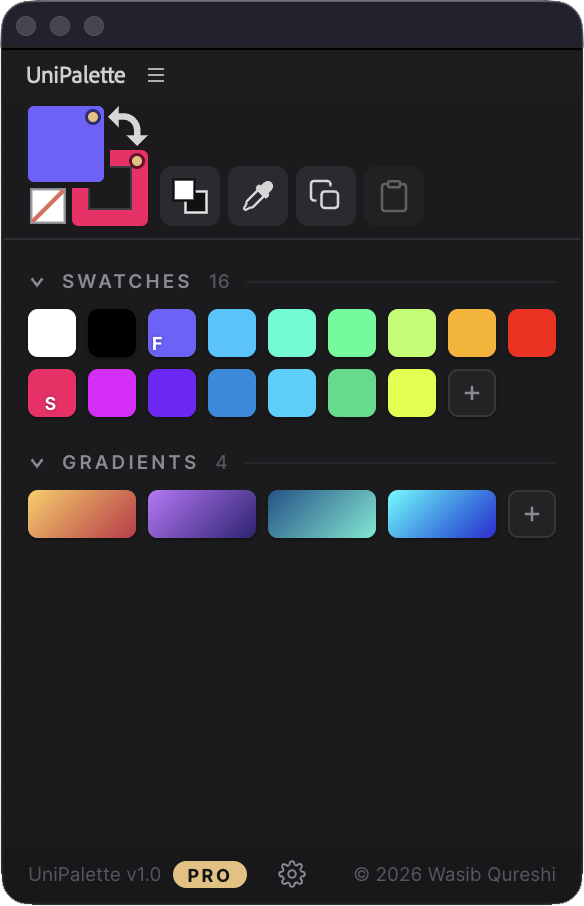
Stop hunting colours. Start linking them.
One swatch edit ripples through every comp, precomp and duplicate. No expressions, no plugins.
Features
A dockable panel with a dark UI that matches After Effects, keyboard-driven where it counts.
Edit once, recolour everywhere
Every layer you colour stays linked to its swatch. Change the swatch and every linked layer follows, through duplicates, precomps, and nested comps.
Sample anything
Grab fill, stroke, or gradient from a selected layer, or pick straight off the screen. Shift+I / Alt+I shortcuts (Cmd/Opt on Mac).
Fills, strokes, text & footage
Shape fills and strokes, text colour, solids and footage via a Fill effect. Nothing proprietary baked into your project.
Per-layer pause & conflicts
Untick one checkbox and a layer stops following its swatch. Hand-tweaked a linked layer? Reapply or unlink in one click.
Multi-stop gradients
Linear & radial, unlimited stops, per-stop opacity, applied as native AE Gradient Fills. With Pro, stops link to solid swatches.
No expressions. No plugins. Pure AE.
UniPalette drives plain After Effects colour properties and effects. Nothing on the render path, nothing required on a render farm. Projects render perfectly on machines that have never heard of it.
Import & export
Export the full palette as .unipalette.json. Import that, or an .ase Adobe Swatch Exchange from Photoshop, Illustrator or a brand book.
The palette travels with your project
Stored inside the .aep itself. It saves as you work and loads the moment the project opens, on any machine. No sidecar files, no manual saving, nothing to hand off or lose.
One-time purchase. No subscription.
Start free with your brand's core colours. Upgrade once and own it for good.
Free
- Full linking engine & project-wide recolour
- Eyedropper & screen sampling
- Conflict detection & resolve
- Up to 2 swatches per group (fills, strokes, gradients)
- Swatch-linked gradient stops
- Import / Export
Pro
- Everything in Free
- Unlimited swatches in every group
- Swatch-linked gradient stops: edit one swatch, every gradient updates
- Export palettes (.json) · import .json & .ase
- 2 machines per license (like Adobe)
Pro Team
- Everything in Pro
- 5 licenses in one purchase
- 2 machines per seat
- One invoice for the whole team
| Feature | Free | Pro / Pro Team |
|---|---|---|
| Linked fills, strokes & multi-stop gradients | ✓ | ✓ |
| Palette saved inside the project file | ✓ | ✓ |
| Eyedropper & screen sampling | ✓ | ✓ |
| Swatches | 2 per group | Unlimited |
| Swatch-linked gradient stops (project-wide updates) | ✕ | ✓ |
| Export .json · import .json / .ase | ✕ | ✓ |
| Machines per license | unlimited | 2 per license |
All sales final. Try the Free tier first and buy when it clicks. Prices in USD; taxes handled at checkout by Lemon Squeezy.
Questions, answered
Which After Effects versions are supported?
Is there a trial?
How many computers can I use Pro on?
What updates do I get?
Does it work offline?
Will my project open fine for someone without UniPalette?
Can I upgrade from Free to Pro later?
How do I install it?
.zxp package. Install it with any ZXP installer (like aescripts' ZXP Installer), no PlayerDebugMode required. On Windows, run the installer as administrator — and if you are updating, uninstall the previous version first. Some ZXP installers report success without writing anything when they lack permission. A full installation guide, quick start, and FAQ are included with the download.Something's not working. How do I get help?
Give your next project a palette.
Try the Free tier today. No card, no time limit.
Get UniPalette v1.0